





 Portuguese
  English
  Spanish
  4 min of reading
  0 comments



Understand Why a Light Blinks in Front of Your Device and How the Facial Recognition System Works Without Invading Your Privacy.
Many users have already noticed a blinking light at the top of their screen and wondered: is my iPhone taking pictures without my permission? The concern is valid, especially when this “flash” is seen through another camera, like a security camera. The suspicion that the device is secretly recording or photographing every few seconds is a common doubt.
But the technical reality is quite different and does not involve spying. The observed activity is, in fact, a benign and safe function of your device, designed to enhance your user experience. This article explains what this light is, why it blinks and how your data remains protected throughout the process.
The Mysterious Red Light: What Your iPhone Is Really Doing When It Blinks
The perception that the iPhone takes pictures by itself usually arises when observing the device through another camera. What is seen is a small red light or flash blinking every 5 seconds in the notch area (where the front camera and sensors are located).
-
Man builds functional 5-meter submarine in his garage using gas cylinders, PVC pipes, and a refrigerator motor, and navigates with the vessel on a lake in Colombia.

-
A couple buys an old chalet, breaks the kitchen floor for renovation, and finds over a thousand coins of gold and silver hidden since the English Civil War over 4 centuries ago.

-
Millions of people have been eating yam for centuries without knowing that this humble tuber contains a compound called diosgenin, which scientists have now discovered can improve memory and help control blood sugar levels.

-
Rigid bags with their days numbered: new trend prioritizes comfort in 2026.

This phenomenon is almost always invisible to the naked eye but is easily captured by other devices. The immediate conclusion for many is that the phone is taking pictures. However, what is happening is the operation of a much more complex system that has nothing to do with photography.
It’s Not a Photo: Understand the TrueDepth Camera System and Its Infrared Sensors
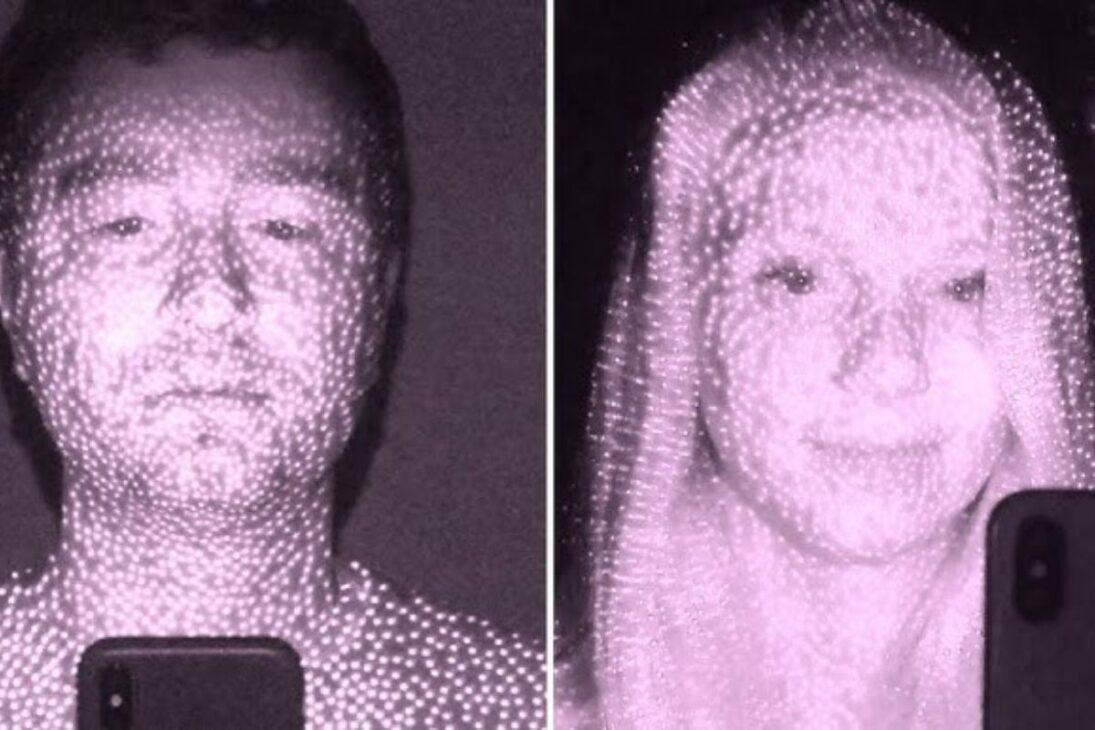
The blinking light does not come from the photo camera but from the TrueDepth camera system, first introduced with the iPhone X. This system is responsible for Face ID technology and uses a set of sensors that emit infrared (IR) light.
The three main components are:
- Proximity Illuminator: emits infrared light to detect a face, even in the dark.
- Dot Projector: projects over 30,000 invisible dots onto your face.
- Infrared Camera: captures the pattern of the dots to create a 3D map of your face.
The infrared light is invisible to the human eye, but the sensors of most digital cameras can detect it. That’s why you only see the “flash” through another device. The system is “seeing” in depth to map, not taking a 2D photo.
Why Does the Light Blink? The “Attention Detection Features” Function and Its Utility
The TrueDepth system does not only work to unlock the iPhone. It also performs periodic checks for a function called “Attention Detection Features”. The aim is to make device usage smarter.
By checking if you are looking at the screen, the iPhone can:
- Not Dim the Screen: if you are reading an article, the brightness will not be reduced.
- Lower Alert Volume: if you are already looking at the phone when a call comes in, the ringtone volume decreases, as the system understands you have already noticed.
- Prevent Automatic Lock: while attention is on the screen, the device will not lock.
This check occurs every few seconds, which explains the interval of the blinking light. It is a function that can be disabled in Settings > Accessibility > Face ID & Attention.
Are Your Data Safe? The Privacy of Face ID and Device Processing
The main concern, privacy, is addressed by Apple with rigor. All data collected by the TrueDepth system, both for Face ID and for the attention features, are processed and encrypted directly on your iPhone.
This information is never sent to Apple’s servers or included in backups. The data is stored in a dedicated hardware component called Secure Enclave, a digital vault isolated within the device’s processor. No applications or even the main operating system can access this facial data. They only ask the Secure Enclave if the face matches, receiving a “yes” or “no” response.
How to Actually Take Photos in Sequence on Your iPhone


Now that the myth has been dispelled, how can you actually take photos every 5 seconds? The native camera is not the best option for that.
The Time-Lapse mode of the iPhone camera does not allow for a fixed interval. It dynamically adjusts the capture speed so that the final video always lasts between 20 and 40 seconds, regardless of the total recording time.
To have precise control, the best solutions are:
- Third-Party Apps: the App Store has “intervalometer” apps (like ProCamera or Lapse It Pro) that allow you to set exact intervals, control focus, and other manual settings.
- Shortcuts App: you can create an automation in the Shortcuts app for the phone to take a picture, wait 5 seconds, and repeat the process. Although free, this method consumes a lot of battery and requires the app to remain open.







-

Uma pessoa reagiu a isso.