





 Portuguese
  English
  Spanish
  5 min of reading
  0 comments


Google And WhatsApp Adopt Passwordless Authentication With Passkeys, Technology That Uses Biometrics And Cryptography To Replace Traditional Logins And Reduce The Risk Of Digital Fraud. Experts Identify A Global Trend To Abandon Passwords On Major Platforms.
Password login, dominant on the internet for decades, is beginning to lose ground in the most used services in the country.
Google Has Started To Adopt Passkeys As The Default Option For Personal Accounts, Reducing Reliance On Passwords And SMS Codes.
WhatsApp Has Also Integrated The Technology, Allowing Authentication Through Biometrics Or Screen Lock On Android, In Line With FIDO And WebAuthn Standards.
-
Motorola launched the Signature with a gold seal from DxOMark, tying with the iPhone 17 Pro in camera performance, Snapdragon 8 Gen 5 that surpassed 3 million in benchmarks, and a zoom that impresses even at night.
-
Satellites reveal beneath the Sahara a giant river buried for thousands of kilometers: study shows that the largest hot desert on the planet was once traversed by a river system comparable to the largest on Earth.

-
Scientists have captured something never seen in space: newly born stars are creating gigantic rings of light a thousand times larger than the distance between the Earth and the Sun, and this changes everything we knew about stellar birth.

-
Geologists find traces of a continent that disappeared 155 million years ago after separating from Australia and reveal that it did not sink, but broke into fragments scattered across Southeast Asia.

According To Digital Security Analysts, The Combination Of Adoption In High-Reach Platforms And Native Support In Operating Systems Indicates A Structural Shift In User Authentication Methods.
What Are Passkeys And How Do They Work
Passkeys Are Cryptographic Credentials Based On A Public And Private Key System.
Instead Of The User Creating And Memorizing A Password, The Service Registers A Public Key, While The Corresponding Private Key Remains Securely Stored On The Device Or In The Platform’s Credential Manager.
During Login, The Verification Takes Place Locally — Through Biometrics, PIN, Or Unlock Pattern — And The Server Validates The Identity Through A Cryptographic Challenge.
Since There Is No Sharing Of A Reusable “Secret,” Attacks Such As Phishing And Data Breaches Of Password Banks Become Less Effective, According To Information Security Experts.
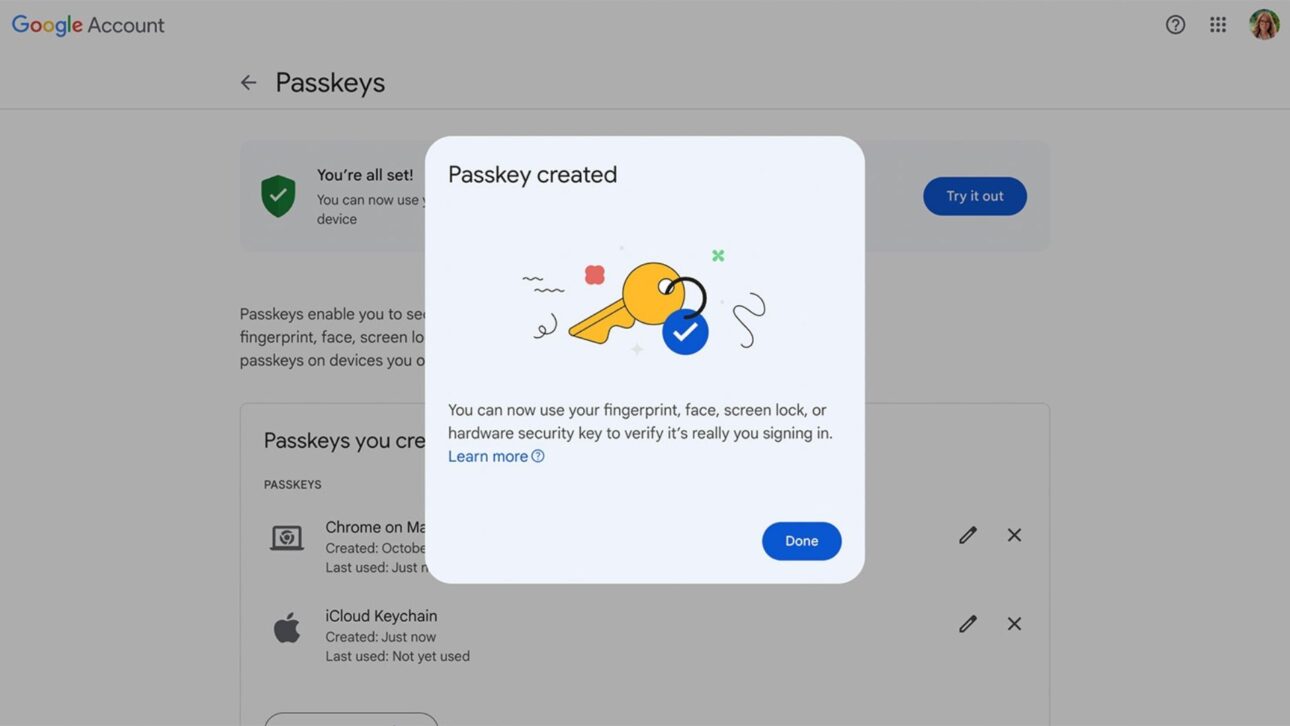
The Method Uses The Same Technical Basis As Physical Keys Compatible With FIDO, But Now Integrated With Mobile And Computer Systems.
Implementation On Android, iOS, And Windows
On Android, Passkeys Are Managed By The Google Password Manager And Can Be Used In Apps And Websites That Have Enabled The Feature.
In The Apple Ecosystem, The iCloud Keychain Manages This, Automatically Providing The Passkey In Login Fields.
Windows Hello Offers Biometrics And PIN For Authentication, With Support In Chromium-Based Browsers And Microsoft Edge.
In All Cases, The Process Tends To Be Reduced To A Simple Step: Confirmation By Fingerprint, Facial Recognition, Or Biometrics, Eliminating The Need To Send Temporary Codes Via SMS Or Email.
The Change In Google’s Standard
Google’s Decision Is Practical.
For Personal Accounts, When Accessing Security Settings Or Starting A New Login, The System Suggests Creating And Using A Passkey As The Preferred Method.
The Traditional Password Remains Available, As Do Other Verification Factors, But The Company Indicates That The Experience Tends To Be Simpler And Faster.
Users Managing Multiple Sessions Can Complete Authentication On Their Device Or Via Another Authorized Device Using QR Code, Keeping Cryptographic Protection Only On The User’s Side.
WhatsApp Adopts Passkeys On Android
In WhatsApp, Passkeys Have Been Added As An Alternative To SMS And Email In Confirmation And Account Recovery Processes.
The App Uses The Security System Already Configured On The Phone — Biometrics, Facial Recognition, Or Unlock PIN — To Validate Access.
The Feature Follows FIDO Specifications, Which Increases Compatibility With Recent Devices And Reduces Reliance On Methods Subject To Message Interceptions, SIM Card Cloning, Or Social Engineering, According To Industry Experts.
Impacts On Security
The Main Technical Justification For Replacing Password Login Is The Reduction Of Known Vulnerabilities.
According To Cybersecurity Researchers, Weak, Reused, Or Leaked Passwords Are One Of The Main Vectors For Digital Attacks.
Since The Passkey Is Linked To The Correct Domain And Stored Locally, It Cannot Be Used On Fake Sites And Eliminates The Need To Send Codes Via SMS, A Channel Frequently Exploited In Cloning Scams And Message Redirects.
The Model Also Reduces The Number Of Authentication Steps, A Factor That, According To FIDO Alliance Studies, Tends To Increase User Adoption By Making The Process Faster And Less Prone To Error.
Care And Limitations
The Use Of Passkeys Depends On The Physical Protection Of The Device.
If The Phone Or Computer Is Not Locked With A Password, Biometric Data, Or PIN, Authentication Loses Part Of The Promised Security.
For Accounts Containing Sensitive Information, Such As Digital Wallets Or Corporate Services, Administrators May Adopt Multiple Verification Factors, Including Additional Physical Keys.
Some May Also Choose To Store Passkeys Only Locally, Without Syncing Them To The Cloud.
This Alternative Increases Individual Control But Requires Care When Changing Devices.
Companies Offering The Feature Continue To Maintain Account Recovery Methods With Additional Verification Steps To Reduce The Risk Of Digital Hijacking.
Passwords Do Not Disappear But Lose Priority
The Introduction Of Passkeys Does Not Immediately Eliminate The Use Of Passwords.
According To Google, The Goal Is To Reorder The Access Hierarchy, Making Key Authentication The Primary Method And Leaving The Password As A Fallback Option.
For Users, The Transition Reflects In Subtle Signs, Such As The Presence Of The “Use Passkey” Button On Login Screens, Invitations To “Skip Password When Possible,” And Automatic Suggestions For Creating Credentials In New Services.
In Corporate Environments, IT Departments Have Begun Internal Adoption Campaigns, Integrating Passkeys Into Federated Identity Policies.
Adoption And Network Effect
Native Support In Android, iOS, Windows, And macOS, Along With Compatibility With Major Browsers, Has Eliminated The Need For External Applications.
According To Industry Experts, This Consolidated Technical Base, Coupled With The Adoption By Major Platforms, Is Likely To Generate A Network Effect: The More Services Adopt The Standard, The Greater The Pressure For Banks, E-Commerce, And Public Agencies To Implement It As Well.
In Brazil, The Widespread Presence Of Compatible Smartphones Facilitates This Transition.
Financial Institutions And Technology Companies Have Dished Out Guidance On The Subject, Reinforcing Basic Security Measures Such As Keeping The Screen Lock Active And Verifying The Domain Before Approving Pairings Between Devices.


How To Activate Passwordless Authentication
Users Who Wish To Activate The Feature Can Do So Directly In Security Settings.
In The Case Of Google Accounts, It Is Possible To Create A Passkey On The Device Itself Or Validate It With Another Device.
In WhatsApp, The Option Is Available In The Account Menu; After Setup, Future Access Can Be Authorized By Biometrics, Without The Need For SMS.
In Both Services, Authentication Is Valid Only On Official Domains And Apps, A Measure That Prevents Credential Capture Attempts By Fake Sites.
A New Phase In Digital Authentication
The Expansion Of Passkeys Is Seen By Experts As A Relevant Technical Advance, Supported By Open Standards And Backed By Major Operating Systems.
The Model Promises To Reduce Security Incidents Related To Passwords And Simplify Access To Digital Services.
In Light Of This Change, Users And Companies Are Encouraged To Evaluate The Adoption Of The Method And Review Authentication Settings On Their Accounts. Among The Services You Use Daily, Which Would Be The First To Receive A Passkey?







Seja o primeiro a reagir!