





 Portuguese
  English
  Spanish
  3 min of reading
  1 comment


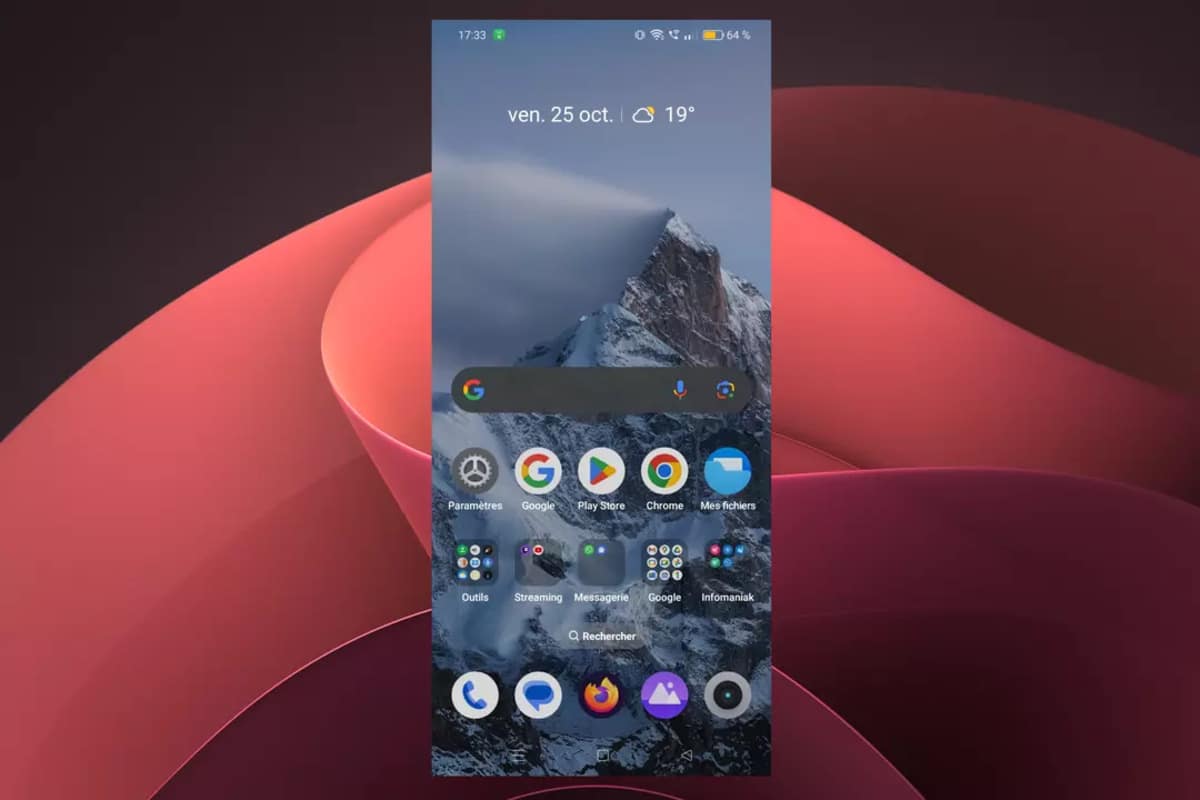


Discover How Efficient App Organization Can Make Your Daily Life Easier and Optimize Your Cell Phone Use.
The modern cell phone is an indispensable tool in daily life, offering a plethora of applications for various purposes, from accessing social media to managing finances.
However, as the number of applications grows, the home screen can quickly become a disorganized and confusing space.
Searching for a specific app among so many icons can be frustrating and time-consuming. Fortunately, there is a simple solution to this problem: using app folders.
-
Beet greens that end up in the trash in many kitchens contain a high concentration of antioxidants, and a 2025 study shows that extracts may have even more potent activity when transformed into microparticles.
-
Something was orbiting Earth before any human launched a satellite into space: scientists have found thousands of unexplained flashes in old photos of the sky, and a NASA researcher says the evidence points to non-human intelligence.

-
There is a gap of hundreds of kilometers between weather observation points in the United States, and now drones flying at 6,000 meters altitude in strong winds are filling this gap to predict tornadoes before they kill.

-
The most famous volcano in the world could paralyze one of the largest metropolises on the planet: Japan accelerates emergency plans for the eruption of Mount Fuji, which could bury Tokyo in ash for over two consecutive weeks.


Why Use App Folders?
App folders are an effective way to organize your home screen by grouping similar apps into specific categories. This way, your interface becomes cleaner, more organized, and functional.
For example, instead of having scattered icons for Instagram, Facebook, and Twitter (now X), you can group them into a single folder called “Social Media.”
Apps like calculator, voice recorder, and stopwatch can be organized into a folder titled “Utilities.”
This practice not only frees up space on the screen but also makes it easier to quickly locate applications, reducing visual clutter.
According to a study conducted by Statista, the average cell phone user has about 80 apps installed, of which only 9 are used daily. This highlights the importance of effective organization to enhance the user experience.
How to Create App Folders
Creating app folders is a simple process and can be done in a few steps, both on Android and iPhones. Check out the practical guide:
- Press and hold the icon of the app you want to organize.
- Drag the app to another similar one you want to group.
- A folder will be created automatically containing the two apps.
- Rename the folder to clearly identify its content.


After creating, you can customize your folders according to your needs. Some options include:
- Changing the folder name to something intuitive.
- Rearranging the placement of folders on the home screen for easier access.
- Adding or removing apps from a folder at any time.
- Merging similar folders to keep organization efficient.
Additionally, on Android devices, you can customize the folder icon, making the experience even more personalized.
Transforming Your Home Screen
Creating folders allows you to transform your home screen into a functional and intuitive space. This reduces the need to scroll or manually search for apps.
An organized home screen can be customized according to your preferences, for example:
- Creating categories like Work, Entertainment, and Health.
- Grouping apps by frequency of use.
- Keeping only the essential folders on the first page of the home screen.
A study by Asurion revealed that smartphone users check their devices an average of 96 times a day.
This demonstrates the importance of an organized screen to save time and reduce frustration when quickly accessing essential apps.
The Benefits of an Organized Cell Phone Home Screen
Organizing apps on your cell phone is not just a matter of aesthetics, but also of functionality and productivity. With a well-structured home screen, you can:
- Save time by quickly finding what you need.
- Reduce cognitive overload by eliminating visual distractions.
- Increase efficiency by making phone use more intuitive.
- Improve the user experience by providing a smooth and practical navigation.
Furthermore, keeping the home screen organized can even extend your device’s lifespan. A less cluttered and more accessible interface can reduce unnecessary usage time and battery consumption.
Organizing your cell phone’s home screen is a simple step that can bring significant benefits to your daily life.
Using app folders is a practical solution that improves navigation, reduces visual clutter, and increases efficiency in using the device.
With a few quick changes, your home screen can become an intuitive and personalized space, facilitating access to the tools you use the most.








Oh não diga. É isso que acontece quando o você fica sem Internet, começa a descobrir coisas basicas e elementares. De toda forma, parabéns pra vc que ganha dinheiro para escrever essas bobagens.