Portuguese
  Spanish


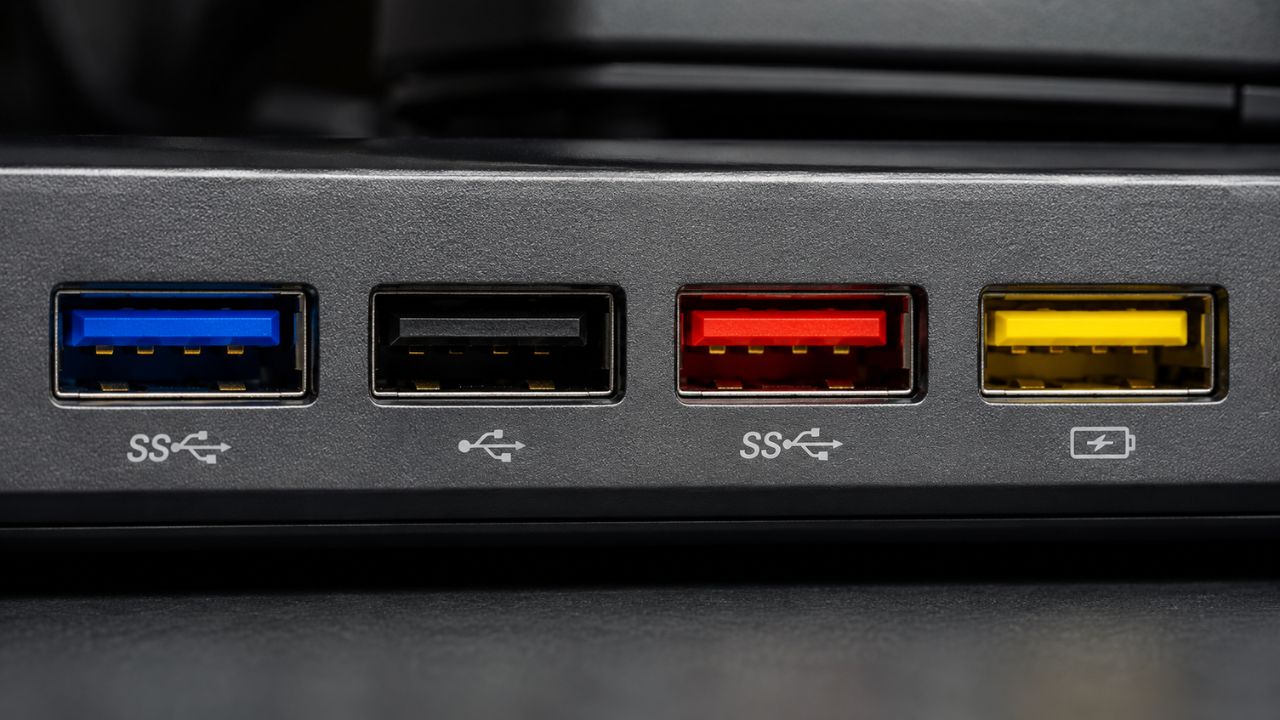

USB port colors indicate speed and function, but they don’t follow an official standard. Learn what blue, black, red, and yellow usually mean — and why you shouldn’t rely solely on color.
USB port colors are often used as a quick reference to identify a port’s type and speed, but this logic isn’t always reliable. Although popular associations exist between colors and functions, the lack of official standardization means that the meaning varies between devices. As a result, users can get confused by relying solely on visual appearance.
What do USB port colors really mean?
Before analyzing colors, experts point out that other factors are more reliable for understanding a USB port’s performance.
Key points include:
-
Former Atacadão Employee Turns Online Cake-Baking Lessons into a Confectionery Brand with Factory, Store, Delivery, and Nearly $400,000 in Revenue

-
Brazilian Startup Sells Nearly 9 Million Surprise Bags of Near-Expiry Food, Prevents Thousands of Tons of Waste, Aiming for $42 Million Revenue by 2026
-
How to Prevent Brown Recluse Spider Bites: Common Hiding Spots and Free Tips to Reduce Risks

-
Natto: The Unusual Japanese Superfood Gaining Popularity on Social Media and Driving Record Exports




- Speed indication, such as 5 Gbps, 10 Gbps, or 20 Gbps
- Device technical information
- Controller type or internal connection
These elements offer more precise data than the port’s color.
The use of USB port colors began as an attempt to facilitate the identification of different generations of the technology.
Over time, users began to associate hues with certain performance standards. However, this strategy was never fully official, which limits its reliability.
How USB port colors are interpreted in everyday use
Even without fixed rules, some interpretations have become common over the years.
See the most frequent associations:
- White: older versions with low speed
- Black: USB 2.0 standard, still very common
- Blue: faster connections
- Red or yellow: ports with continuous power supply
These references serve as an initial guide, but do not guarantee accuracy.
The main reason for the inconsistency is manufacturers’ freedom. The body responsible for the USB standard does not require specific colors for traditional ports.
Although blue has been suggested to identify faster connections, this recommendation is not mandatory.
Thus, each company can apply colors according to its own criteria.


USB port colors are disappearing in modern devices
In more recent equipment, many ports appear in the same color, usually black.
This choice prioritizes aesthetics and visual uniformity, but reduces the usefulness of colors as a technical indicator.
As a consequence, the user needs to look for other ways to identify the connection’s capabilities.
White and black colors remain associated with older technologies, which are still used in various peripherals.
These connections frequently appear in:
- Keyboards
- Mice
- Printers
- Adapters
Although functional, these versions have inferior performance for data transfer.
Blue is the most reliable color
Among all options, blue is the most consistent indicator. It usually represents higher speed ports, such as USB 3.x.
Even so, there is no absolute guarantee, as the use of color depends on the manufacturer’s decision.
With the advancement of technologies, new colors began to be used in USB ports, which ended up making identification less intuitive for users.
Unlike more traditional shades, these variations do not follow a defined standard.

In many cases, teal shades are associated with faster connections, while red can indicate both high performance and ports that remain active even when the device is turned off.
Yellow usually appears in inputs designed for continuous charging, and orange is also frequently linked to power supply.
Still, these interpretations are not universal. As each manufacturer can adopt its own criteria, the meaning of colors can vary greatly from one device to another.
USB port colors show evolution, but don’t guarantee clarity
The advancement of USB technologies brought more speed and functionalities, but also increased complexity.
Colors accompanied this evolution, but without clear standardization. This makes the system function more as an indication than as a rule.
Knowing the most common meaning of USB port colors can help in everyday use. However, relying solely on this criterion can lead to errors.
Therefore, the ideal is to combine visual analysis with technical information to ensure the best use of available connections.
With information from IG